

Instead of chasing receipts and guessing where to send them, organize filing an out of network dental insurance claim into a documented workflow: confirm benefits, assemble the claim, submit it, and reconcile the insurer’s decision with any payment. This 2026 guide explains how to manage each stage without confusing claim acceptance with reimbursement.
- Filing an out of network dental insurance claim starts with confirming benefits, not uploading a receipt.
- Starboard Dental serves patients seeking general, restorative, and cosmetic dental care in Kennebunk, York, and Saco.
- Keep the completed dental claim form, supporting records, and submission confirmation together.
- An explanation of benefits explains the claim decision; it is not proof that reimbursement arrived.
Why this matters
An out-of-network claim requests benefits under your dental plan; it does not guarantee reimbursement. Your plan determines whether out-of-network care qualifies, which services it covers, and who receives an approved payment. A successfully uploaded document answers none of those questions by itself.
Starboard Dental is a fit for families seeking general, restorative, and cosmetic dental care in Kennebunk, York, and Saco. Choosing your dental practice and understanding your insurance benefits are separate decisions. Confirm the practice’s network status with your insurer for your specific plan rather than assuming it from the insurance company’s name.
The goal is a traceable claim. You should be able to identify what you submitted, whether the insurer received it, what the insurer decided, and whether the payment reached the correct recipient. That record also helps distinguish a missing document from a coverage denial.
Before you start
- Gather your access and records. Have your dental insurance card, subscriber information, patient information, insurer’s claim instructions, and the treatment documentation supplied by the dental office. Use the insurer’s current dental claim form when one is required.
- Confirm the rules before preparing the claim. Check out-of-network benefits, eligible services, filing deadlines, required attachments, and payment recipient. Review the plan documents that apply to your treatment date; a 2026 submission can involve coverage from a different benefit period.
- Check whether a claim already exists. Ask the dental office whether it submitted, or will submit, the claim. Then confirm any existing claim with the insurer. Filing another original claim for the same treatment can create a duplicate rather than move the first claim forward.
Keep 1 claim folder per patient as an organizational rule. Store each treatment date separately within that folder so records from different visits do not get mixed together.
Do not guess procedure codes, provider identifiers, or tooth details. Request missing clinical information from the dental office before submission.
Benefit check
Confirm coverage and filing responsibility
- Verify your plan. Match the insurer, plan, subscriber, and patient to the coverage active on the treatment date. When coverage comes through an employer, distinguish the employer’s benefit description from the insurer’s claim instructions.
- Ask about out-of-network benefits. Confirm whether your plan pays benefits for treatment by the dentist you selected. Ask about exclusions, waiting periods, deductibles, annual benefit limits, and service-specific restrictions that apply to the claim.
- Confirm the filing deadline. Ask which event starts the deadline and how the insurer determines timely receipt. Record the answer alongside the relevant plan provision rather than relying on a general deadline found online.
- Identify the submitter and recipient. Establish whether you or the dental office will file. Separately confirm whether an approved payment would go to you or the provider, including how any assignment of benefits affects that decision.
- Record the conversation. Save the date, representative’s name or identifier, reference number, and instructions. If the answer conflicts with your plan documents, request written clarification.
Expected result: You know whether the plan provides applicable out-of-network benefits, who will file, where the claim belongs, and which deadline controls it.
A benefit explanation is not a final claim decision. The insurer still reviews the submitted services and supporting records. Keep that distinction clear when planning treatment or discussing an estimate.
Claim preparation
Assemble the form and supporting documents
- Get the insurer’s required form. Follow the insurer’s instructions for member-submitted dental claims. Use its accepted submission route rather than a medical claim form or a form intended for another plan.
- Enter subscriber and patient information. Copy identifiers carefully from your insurance records. The subscriber is the person carrying the coverage; the patient is the person who received treatment. They are not always the same person.
- Request itemized treatment details. Ask the dental office for documentation showing the treatment date, services, procedure codes, provider information, and any applicable tooth numbers or surfaces. A payment receipt alone does not necessarily contain the information needed to adjudicate a dental claim.
- Match the records to the form. Check that patient names, dates, and service details agree across the documents. Return discrepancies to the office for clarification instead of editing clinical records yourself.
- Include required attachments. Supply proof of payment, clinical narratives, radiographs, or other records when the insurer requires them. Ask the office for the appropriate clinical documentation; do not substitute a personal description of treatment for a professional record.
- Complete required signatures and authorizations. Read the form’s instructions, including any payment-assignment language. Keep a copy of the completed form before sending it.
Expected result: Your claim packet identifies the correct patient and coverage, describes the actual treatment, and includes the documentation requested by the insurer.
Use the minimum necessary records for the claim. Insurance documents contain personal and health information, so submit them through the insurer’s designated channel. Do not post a completed form or insurance card in a public support forum.
For treatment at Starboard Dental, ask the office what documentation it can provide for your dental insurance claim. Confirm any claim-submission assistance directly rather than assuming that preparing documentation means the office will file on your behalf.
Submission record
Send the claim and preserve proof
Choose the route your insurer accepts. The best submission method is the accepted method that leaves you with a usable record, not whichever method sounds fastest.
| Submission route | Best for | Advantage | Limitation |
|---|---|---|---|
| Insurer’s member portal | Members whose plan accepts online dental claims | Can provide an electronic submission record | Available functions and attachment requirements differ by plan |
| Paper submission | Plans requiring mailed forms or members using an accepted mail route | Lets you retain a complete copy of the packet | Mailing proof does not establish that the claim packet is complete |
| Dental-office submission | Patients whose office confirms it will submit | The office can prepare clinical claim information | You still need to verify receipt, payment recipient, and outcome |
- Follow the insurer’s submission instructions. Use the destination or portal workflow specified for your plan. For online submission, follow the actual on-screen fields and accepted file formats; button names differ across insurers.
- Check the packet before sending. Open every attachment and confirm that it is readable, complete, and assigned to the correct patient. Review the final submission summary when the portal provides one.
- Save the submission evidence. Retain the confirmation, reference number, or mailing record alongside a copy of everything sent. Record the submission date and method.
- Verify receipt separately. Check the claim record or contact the insurer. If the claim is absent, ask how to trace the submission before sending another original claim.
Expected result: You have evidence of submission and a way to track whether the insurer received the claim.
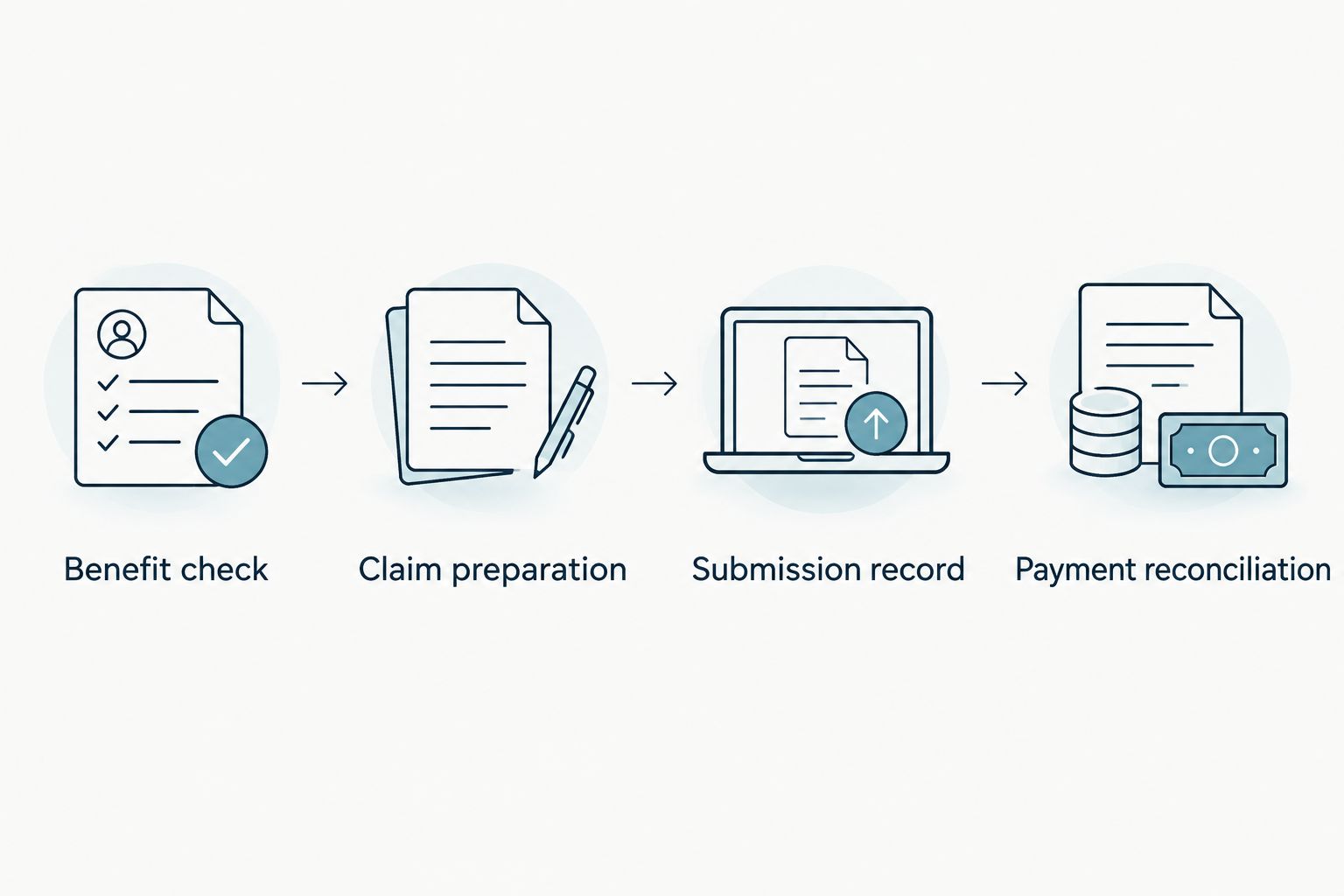
The workflow has four checkpoints: Benefit check, Claim preparation, Submission record, and Payment reconciliation. Each checkpoint answers a different question; completing one does not replace the next.
Payment reconciliation
Read the decision and match the payment
- Find the explanation of benefits. The explanation of benefits, or EOB, describes how the insurer processed the claim. Check the patient, provider, treatment date, and listed services before interpreting the decision.
- Read the reason codes. Identify whether the insurer approved benefits, requested information, applied a plan limitation, or denied a service. Read the accompanying explanation rather than treating every unpaid item as the same problem.
- Distinguish the plan’s allowance from the billed charge. An insurer can calculate benefits using its own allowed amount. A coverage percentage does not, by itself, establish reimbursement for that percentage of the dentist’s full charge.
- Confirm the payment recipient. Check whether the payment was directed to you or the provider. If the EOB indicates payment but nothing arrived, ask the insurer for the payment status and destination.
- Match the payment to the claim. Compare the actual payment with the EOB. If the provider received payment, ask how it was applied to your account and whether any account adjustment is needed.
- Resolve discrepancies before closing the record. Request clarification when the payment, claim decision, or office account does not agree. Keep the explanation with the claim packet.
Expected result: You understand the insurer’s decision and can account for the approved payment, its recipient, and any unresolved issue.
Save 2 records at closeout: the final EOB and evidence of the actual payment or its application to the provider account. These are separate records because an EOB is neither a bill nor a payment receipt.
When a submitted claim needs correction
A corrected claim is an adjacent workflow, not a fresh start. Use it when the insurer identifies inaccurate claim information or requests a corrected submission. Use the appeal process when you dispute the coverage decision itself.
- Identify the existing claim. Locate its reference number, treatment date, and decision notice.
- Ask which process applies. Confirm whether the insurer needs an attachment, corrected claim, reconsideration request, or formal appeal. Follow the specific instructions and deadline for that process.
- Correct the underlying record. Ask the dental office to resolve clinical or provider-data errors. Correct your own member information through the insurer’s required process.
- Link the response to the original claim. Include the claim identifier and required explanation so the insurer can associate the documents with the existing case.
- Track the new decision. Save the acknowledgment, revised EOB, and any changed payment record.
Expected result: The insurer receives a clearly identified response to the existing claim rather than an unexplained duplicate.
Keep corrected submissions and appeals in the same 2026 claim folder as the original packet, with dates that make the sequence clear.
Troubleshooting
The insurer cannot find the claim
Compare your submission evidence with the destination used. Ask the insurer to trace the submission using the patient, treatment date, and reference number. Resubmit only after confirming the appropriate next step and how to avoid a duplicate.
The claim is waiting for information
Request the exact missing item and accepted delivery method. A clearer receipt does not fix a missing clinical narrative, and a narrative does not fix an incorrect member identifier. Send the requested document with the existing claim reference.
The claim was denied as out of network
Read the denial reason and applicable plan provision. Determine whether the plan excludes out-of-network benefits or whether provider information was recorded incorrectly. Correct factual errors; use the appeal instructions when disputing how the plan was applied.
The EOB shows payment, but you received nothing
Check the payee before assuming the payment is missing. Ask the insurer whether payment was issued, where it was directed, and how to trace it. If the dental office was paid, reconcile the office account instead of requesting another member payment.
The decision differs from your expectation
Compare the EOB with the applicable benefit terms, including the allowance, deductible, exclusions, and remaining benefits. Ask the insurer to explain the specific difference. A pre-treatment estimate is not a guarantee of the final claim outcome.
Customize your workflow
Use 3 checkpoints for follow-up: receipt confirmed, decision issued, and payment reconciled. This is a tracking recommendation, not an insurer processing schedule. Ask your insurer for its applicable processing timeframe and use that answer to decide when to follow up.
For recurring dental visits, prepare a reusable checklist containing subscriber information, the accepted filing route, and document requirements. Recheck the plan after a coverage change; do not assume that last year’s instructions apply in 2026.
If your coverage comes through work, the employer dental benefits workflow helps connect benefit review with planning a first cleaning. Keep claim administration separate from decisions about which treatment you need.
Starboard Dental provides general, restorative, and cosmetic dental care for patients of all ages. Discuss your oral health goals with the practice, and direct plan-specific reimbursement questions to the insurer that decides the claim.
FAQ
How do I file an out-of-network dental insurance claim in 2026?
Confirm out-of-network benefits, follow your insurer’s dental claim instructions, and submit the required treatment records. Save proof of submission, then match the explanation of benefits to any payment.
Can I submit a dental insurance claim myself?
You can submit a member claim when your plan accepts member-submitted dental claims. Confirm the required form and filing route, and check whether your dental office already submitted the claim.
Is a dental payment receipt enough to file a claim?
A payment receipt alone is not necessarily enough to process a dental claim. Follow the insurer’s requirements for itemized services, procedure codes, provider details, and supporting documentation.
Does out-of-network dental care always qualify for reimbursement?
No, out-of-network reimbursement depends on your specific dental plan and the services claimed. Check the benefit terms before treating reimbursement as part of your treatment plan.
How long does out-of-network dental reimbursement take?
The applicable timeframe depends on your plan, claim completeness, and processing requirements. Ask the insurer for its timeframe and confirm claim receipt before measuring the wait.
Will the insurance payment go to me or my dentist?
The payment recipient depends on the plan and any applicable assignment of benefits. Confirm the payee before submission and check it again when reviewing the explanation of benefits.
Should I resubmit a dental claim that was denied?
Follow the denial notice instead of automatically submitting another original claim. Missing information, incorrect claim details, and disputed coverage decisions require different responses.
Is an explanation of benefits proof that I was reimbursed?
No, an explanation of benefits records the insurer’s claim decision, not receipt of payment. Match it with the actual payment or confirmation that payment was applied to your dental account.
One last thing
A claim marked processed is not necessarily a claim paid to you. Make payment reconciliation the final task in your 2026 workflow, even when the insurer approved benefits. That small distinction prevents an administrative status from being mistaken for a completed reimbursement.